
LOBBY
Main Hub
Meet friends, choose a mode, and return whenever you want.
/hub ∞INFINITY ARMORJAVA + BEDROCK
THE SHARED WORLD
Browse worlds, race through six minigames, or unlock original armor, powers, and cosmetics. Java and Bedrock players meet in the same hub, with themed gateway arches, glowing signs and brighter mode lobbies.
CHOOSE A DESTINATION
In the Main Hub, tap a Minigames or Adventure entry sign to open a chest-like course menu. Commands remain available on Java and Bedrock.
17 places
Meet friends, choose a mode, and return whenever you want.
/hub
Build your world, craft Infinity gear, and explore the Nether and End.
/play survival
Build freely in a separate flat world with custom blocks and tools.
/play creative
A separate one-life challenge. Your other modes stay available.
/play hardcore
Meet before heading into the shared Survival world.
/lobby survivalChoose the building world and preview custom blocks.
/lobby creativePrepare for the separate one-life challenge.
/lobby hardcore
Choose from six short courses and replay for a faster personal best.
/lobby minigames
Explore two built-in maps with puzzles and landmarks.
/lobby adventureJump across checkpoints above the void.
/minigame parkour
Race a winding course and beat your best time.
/minigame sprintFall through obstacles into the landing water.
/minigame dropper
Move on green and freeze on red. Text cues support touch play.
/minigame redlightTouch five glowing amethyst pads once each, in any order.
/minigame crystalhuntReach the named color within five seconds for five pulses.
/minigame colorrush
Find the seals hidden through an ancient ruin.
/adventure ruinsNavigate a maze and find your way out.
/adventure mazeUse /play minigames or /play adventure to open the same menus. SELECT COURSE signs at course starts reopen them. Your selected map is remembered on reconnect, while an unfinished run starts over. Menu and sign interactions still need a real iPad playtest.
CRAFT · BUILD · COLLECT
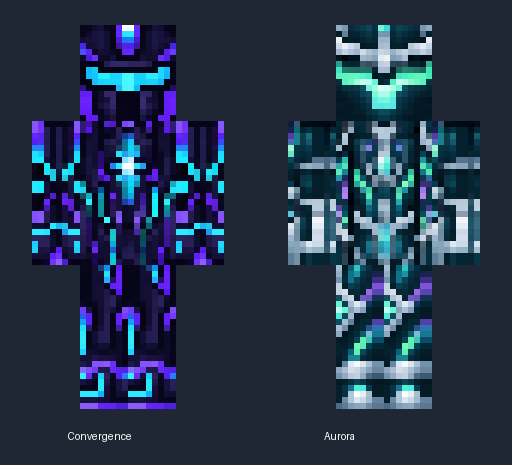
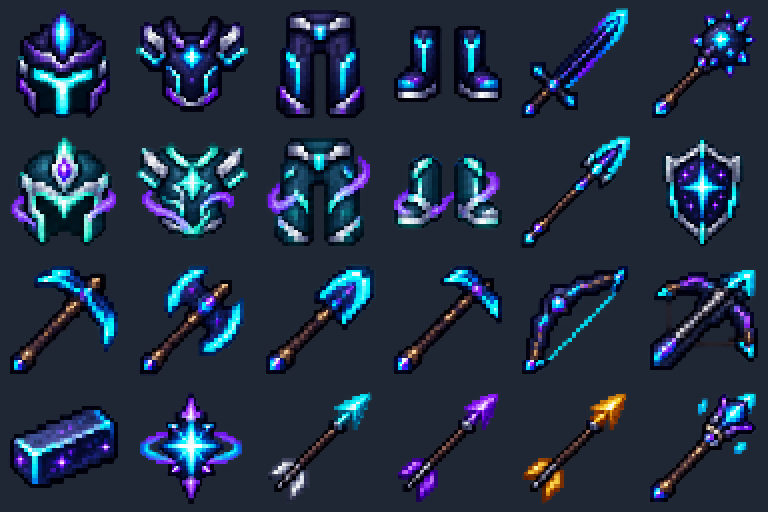
Fresh Convergence and Aurora designs, with matching cosmic weapons and tools. Java and iPad now show refreshed armor. The iPad server pack restyles shared netherite/leather textures while retaining native equipment and flight controls.
Craft Infinity gear and unlock separate achievement powers. Convergence now has cyan stars on indigo plates; Aurora uses mint, icy silver and violet. Open Infinity Menu → Rewards to see what is left.
Select the recovery compass named Infinity Menu, then choose Play Creative. Its Armor & tools → inventory button adds real gear directly to empty slots, including both cosmetic chestplates; Weapons, tools and blocks equips a chosen item; Full Infinity kit, Building kit, power controls, and hand swapping are also available. Hold your tool before selecting the compass so the menu uses the correct item. Every lobby has an INFINITY MENU sign if you lose the compass. Commands remain optional. Java and iPad menu playtests are still needed.

Earn armor looks and backpack styles. Infinity Menu’s Armor sets button supplies all four Aurora or Ember pieces, including the chestplate. Bedrock shows the refreshed Aurora pattern on native dyed leather armor; Ember keeps its warm dye tint on the shared leather pattern. /backpack opens your 27-slot personal storage in supported modes.
MAKE THE MOST OF THE WORLD
All four commands work in game on both editions.
/guideGet directions for the place where you are standing.
/bestCheck your fastest saved minigame times.
/leaderboard parkourCompare saved times for any of the six minigames.
/ptrade <player>Exchange items with another player after both of you review and confirm.
YOUR NEXT CHALLENGE
Check your unlocks in Minecraft with /rewards.
14 rewards · 6 powers · 8 cosmetics
How Did We Get Here?
Flight, night vision and Resistance II.
/power hacksInto Fire
Fire Resistance while enabled.
/power fireguardTake Aim
Speed II and Jump Boost II for 15 seconds, with a 45-second cooldown.
/power windstepAdventuring Time
Speed II, Jump Boost II and night vision.
/power explorerTactical Fishing
Water Breathing and Dolphin’s Grace.
/power aquaticHot Tourist Destinations
Fire Resistance, Resistance I and night vision.
/power netherWithering Heights
Soul particles celebrate summoning the Wither.
/cosmetic witherDiamonds!
A bright sparkle for your first diamond.
/cosmetic diamondFree the End
Dragon particles for defeating the Ender Dragon.
/cosmetic dragonAdventuring Time
A trail for exploring the Overworld biomes.
/cosmetic explorerPostmortal
Golden particles for surviving with a Totem of Undying.
/cosmetic totemWhat a Deal!
Emerald particles for trading with a villager.
/cosmetic emeraldTactical Fishing
A bubble trail for catching a fish in a bucket.
/cosmetic oceanInto Fire
Ember particles for obtaining a blaze rod.
/cosmetic netherOne power preset and one cosmetic can be selected at a time. Powers work only in Survival; movement presets turn off during combat and can be reactivated afterward. Use /power off or /cosmetic off to turn them off. Cosmetics are visual particles, with no damage or bonuses. Unlocks use the Java server’s advancement records, including progress earned by Bedrock players; Xbox achievements are separate.
A BADGE FOR YOUR PROGRESS
Complete all three goals for a rank, or trade its listed items. Use /rank for progress.
Your highest permanent rank shows. Each rank has its own three goals; lower ranks are not prerequisites. All game modes are available on Free. Powers and cosmetics are separate unlocks. Admin is a private, free full-OP4 role configured by the server owner. It bypasses gameplay unlocks and cooldowns. Infinity Menu’s Admin editor lets staff review and change player or AI-helper health, speed, damage, armor, size and other supported stats, plus player hunger and XP, with original-attribute reset controls. Enter health or absorption directly; its confirmation includes any needed capacity increase. Bedrock/iPad stat edits use native buttons, a number field and your own confirmation; manual stats do not wait for Codex approval. Huge health values use a compact percentage display for you and observers; actual saved health and exact Admin editor values stay unchanged. Extreme knockback uses bounded physical impulses to keep the world responsive. AI actions still require both reviews.
OWNER HELPER SQUAD
OP4 owners select Infinity Menu → AI Helpers → Create your first helper. A named robot player avatar appears beside you on clear ground, with a silver face, cyan accents, and small ChatGPT knot and Codex cloud chest emblems. Choose its icon for modes, Follow, Guard, Stay, and a visible status report. Open Orders → Choose player target or Pending orders to propose, review, approve or cancel an exact action. Your approval still waits for a separate live Codex review. The host can connect real Codex and use the Ask Codex button with limited Minecraft facts.
Choose a combat-ready Primitive helper or the standard follow/guard profile. Both offer local help by default and real Codex answers when the host enables that provider.
Ultimate Finals shares targets, charges with a native spear, briefly glides with an equipped elytra and switches to a mace for fall damage. Debug shows health, location and pause reasons. Native player avatars show their held weapons and elytra. Their underlying server AI and physical collision remain golem-based. Orders last up to five minutes and obey PvP and team rules.
Save a code-change request for owner and live Codex review, or ask AI using limited Minecraft facts. Codex uses the host’s signed-in account; the OpenAI API is an optional separate provider with API charges. Questions share a request limit, and answers cannot approve or execute changes.
Faster menus and inventory gear: My stats uses native number forms and a Confirm button on iPad/Bedrock. Java retains private exact-number entry with Review and Confirm. Manual stat edits do not wait for Codex approval. Creative players receive real weapons, tools and complete armor sets directly in empty inventory slots. Choose Armor & tools → inventory to retry; full gear boxes remain available too. Combat attribute caps are lifted for edited instances, while client physics and numeric storage bounds remain. Player targeting and server actions wait for owner approval and live Codex review. Use /agent ceasefire or the menu to stop your own squad. Chat cannot run commands. Helpers use player avatars powered by server-controlled golem AI, with six slots per owner and 24 across the server.
OPTIONAL SERVER SUPPORT · COMING LATER
These are proposed monthly prices. Checkout is not open and no payments are being taken.
$50 USD / month
$75 USD / month
$100 USD / month
$200 USD / month
Free is $0 and includes every game mode. Admin is a free private staff role with an owner-set code, never sold. Go, Plus, Pro, and Ultra are also free permanent badges you can earn above; buying a subscription will not be required to get them. Planned supporter benefits are cosmetic only and will need a working store before they launch.
See prices and setup statusANOTHER WAY TO UNLOCK
These trades spend Minecraft items, never USD. Trade items instead of completing the achievements.
Preview a trade with /trade <id>. When you are ready, add confirm: for example /trade rank-go confirm. Your unlock is permanent; items are spent once.
| Unlock | Items to exchange | Preview command |
|---|---|---|
| Go rank | 16 iron ingots + 8 emeralds | /trade rank-go |
| Plus rank | 8 diamonds + 16 emeralds | /trade rank-plus |
| Pro rank | 16 ender pearls + 8 blaze rods + 32 emeralds | /trade rank-pro |
| Ultra rank | 1 nether star + 16 diamonds + 64 emeralds | /trade rank-ultra |
| Hacks | 1 nether star + 1 dragon breath + 64 diamonds | /trade hacks |
| Fireguard | 4 blaze rods + 8 emeralds | /trade fireguard |
| Windstep | 32 arrows + 8 emeralds | /trade windstep |
| Explorer | 32 emeralds + 4 ender pearls | /trade explorer |
| Aquatic | 16 prismarine shards + 8 emeralds | /trade aquatic |
| Nether | 8 blaze rods + 16 gold ingots + 16 emeralds | /trade nether |
Trades work in Survival outside combat. Carry ordinary, unmodified items in your main inventory or hotbar; named or enchanted items, armor, offhand and stored chests are excluded. Missing items and already-owned unlocks are not charged. Cosmetics remain achievement rewards.
JOIN THE SHARED WORLD
Ask the host for the server hostname and separate Java and Bedrock ports. A configured Dynu hostname stays the same when the home IP changes; free Pinggy tunnel addresses are temporary. This guide site does not host the Minecraft world.
Use Minecraft Java 1.21.11. Open Multiplayer → Add Server and enter the Java host and port the owner gave you.
Sign in to Microsoft/Xbox, then tap Play → Servers → Add Server. Enter the Bedrock host and separate UDP port.
Join and accept the server resource pack for the custom looks. Friends do not need a hosting or DNS account.
Host: keep the Mac awake, start the world with Start-Mac.command, configure your Dynu hostname and router forwarding, then run Start-Dynu-Mac.command to keep its IP updated. Share the saved hostname and game ports. Your private dashboard stays on your Mac.